Skip to content
Introduction
If you're tired of expensive cable bills and limited channel choices, you're not alone. More people in the USA and UK are switching to IPTV for a smarter, more flexible way to watch TV.
An IPTV box can completely change how you stream content—giving you access to live TV, movies, and series anytime, anywhere.
What is an IPTV Box?

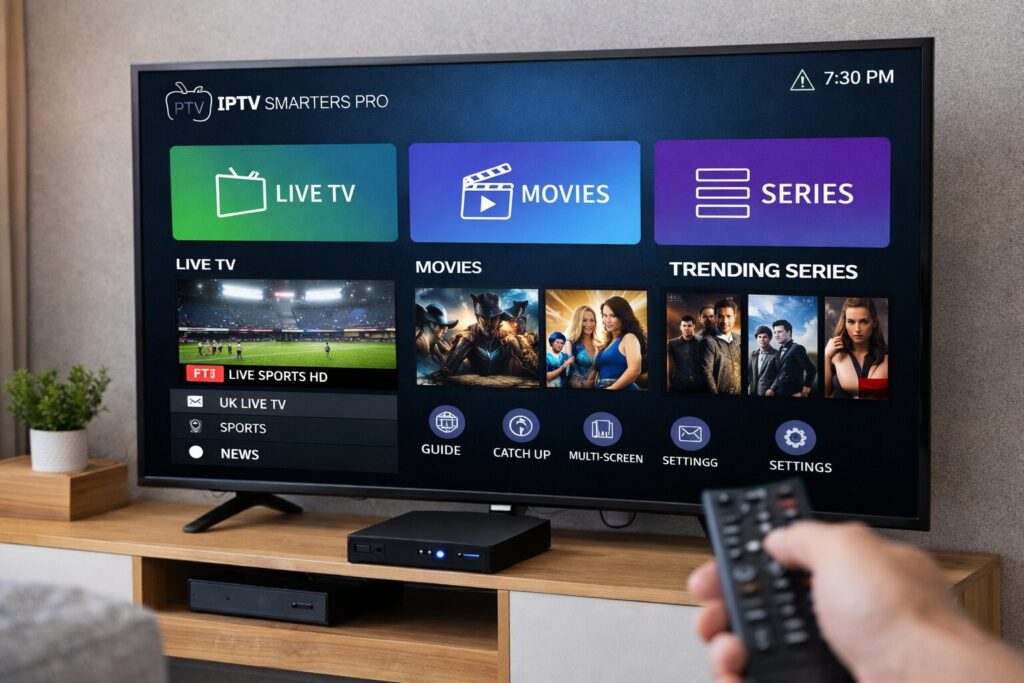
An IPTV box is a device that connects your TV to the internet so you can stream TV channels and on-demand content.
Unlike traditional cable or satellite TV, IPTV delivers content through your internet connection. This means:
- No satellite dish
- No cable installation
- More flexibility and control
Think of it like turning your TV into a smart streaming hub.
How IPTV Works
IPTV stands for Internet Protocol Television. Instead of broadcasting signals like cable TV, IPTV streams content over the internet.
Here’s how it works:
- You subscribe to an IPTV service
- You install an app like iptv smarters pro
- You connect your IPTV box or smart TV
- You start streaming live channels and on-demand content
Types of IPTV Content
- Live TV – sports, news, entertainment
- VOD (Video on Demand) – movies and series
- Catch-up TV – watch missed programs
Benefits of IPTV vs Traditional Cable
Switching to IPTV offers several advantages:
1. Lower Cost
Cable subscriptions are expensive. IPTV subscriptions are usually much cheaper with more content.
2. More Channels
Access thousands of channels worldwide, not just local ones.
3. On-Demand Content
Watch what you want, when you want.
4. Multi-Device Support
Use IPTV on:
- Smart TVs
- Smartphones
- Tablets
- Streaming devices
5. No Contracts
Most IPTV providers offer flexible plans without long-term commitments.
Types of IPTV Devices
You don’t necessarily need a dedicated IPTV box, but it helps improve performance.
Popular IPTV Devices
- Android TV Box (most common IPTV box)
- Amazon Firestick
- Smart TVs (Samsung, LG)
- MAG boxes
IPTV for Smart TV
If you already have a smart TV, you can install apps directly without needing extra hardware.
How to Set Up an IPTV Box (Step-by-Step)

Setting up IPTV is easier than you think.
Step 1: Choose a Reliable IPTV Provider
Start by selecting a trusted provider like FlexvesionPro, known for stable servers and high-quality streams.
Step 2: Connect Your IPTV Box
Plug your IPTV box into your TV using HDMI and connect it to the internet.
Step 3: Install an IPTV App
Download apps such as:
- iptv smarters pro
- TiviMate
- Smart IPTV
Step 4: Enter Your Subscription Details
Your provider will give you login credentials or an M3U link.
Step 5: Start Streaming
Open the app and enjoy live TV, movies, and series instantly.
Best Apps for IPTV Streaming
Choosing the right app improves your experience.
Top IPTV Apps
- iptv smarters pro – beginner-friendly and popular
- TiviMate – advanced features and customization
- Smart IPTV – simple and reliable
What to Look for in an IPTV App
- Easy navigation
- Fast loading speed
- EPG (TV guide support)
- Multi-screen support
Choosing the Best IPTV Provider
Not all IPTV providers are equal. This is one of the most important decisions.
Key Factors to Consider
- Server stability
- Channel variety
- Streaming quality (HD/4K)
- Customer support
- Compatibility with devices
Recommended IPTV Provider
If you're looking for a reliable and smooth experience, FlexvesionPro stands out as a trusted IPTV supplier. It offers:
- High-quality streaming
- Wide range of channels
- Fast and stable servers
- Easy setup
IPTV Tips for Better Streaming
To get the best experience from your IPTV box, follow these tips:
1. Use a Fast Internet Connection
At least:
- 10 Mbps for HD
- 25 Mbps for 4K
2. Use Ethernet Instead of Wi-Fi
A wired connection is more stable.
3. Keep Your Apps Updated
Updates improve performance and fix bugs.
4. Choose a Good IPTV Subscription
A poor provider can ruin your experience.
Is IPTV Legal?

IPTV itself is legal. However, legality depends on the provider and content rights.
Always choose a trusted and legitimate IPTV provider to stay safe.
For more information, you can check:
- Federal Communications Commission (FCC)
- Ofcom UK
- European Commission digital services
FAQ
1. What is the best IPTV box for beginners?
Android TV boxes are the best option because they are affordable, easy to use, and compatible with most IPTV apps.
2. How do I get IPTV?
You need an IPTV subscription, a device (like an IPTV box or smart TV), and an app such as iptv smarters pro.
3. Can I use IPTV on a smart TV?
Yes, many smart TVs support IPTV apps directly, so you may not need an IPTV box.
4. Do I need a VPN for IPTV?
A VPN is optional but can improve privacy and help avoid ISP throttling.
5. What internet speed is required for IPTV streaming?
- SD: 5 Mbps
- HD: 10 Mbps
- 4K: 25 Mbps
Conclusion
An IPTV box is one of the easiest ways to upgrade your home entertainment setup. It gives you more control, more content, and better value compared to traditional TV services.
If you're just starting, focus on three things:
- A reliable IPTV provider
- A stable internet connection
- A user-friendly app
For a smooth and high-quality experience, FlexvesionPro is a strong choice for anyone looking to get started with IPTV streaming.