Skip to content
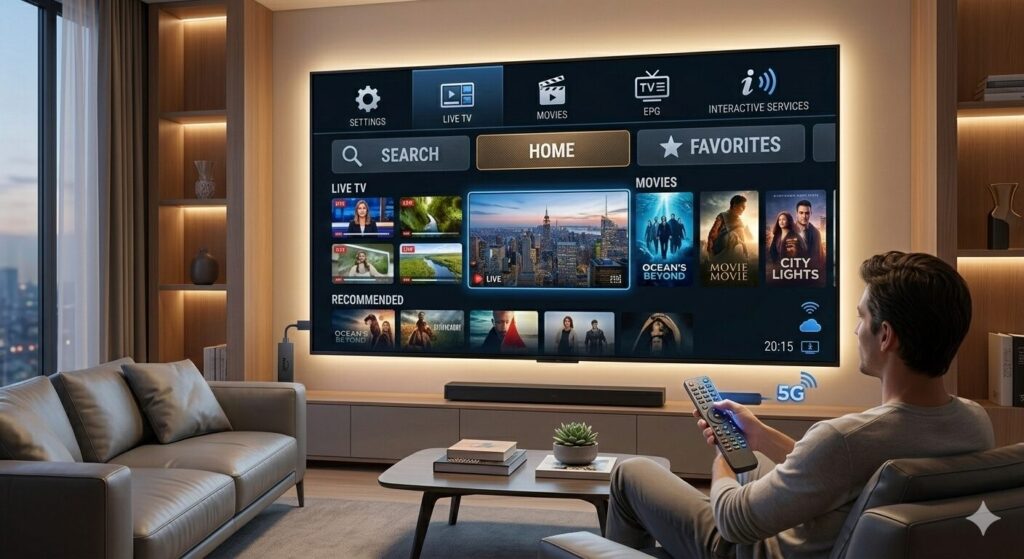
If you’ve ever searched for a way to watch live TV, movies, or sports without relying on traditional cable, you’ve probably heard about an IPTV app.
At first, the concept can sound a little technical. But honestly, once you understand how it works, it’s surprisingly simple.
An IPTV app is basically a streaming application that lets you watch television channels and on-demand content through the internet instead of satellite or cable. Think of it like the apps you already use for streaming — just designed specifically for TV channels and IPTV services.
Let’s break it down in a clear and practical way so you understand exactly how it works and how people use it.
What Is an IPTV App?

An IPTV app is software that allows your device to play IPTV streams provided by an IPTV service.
In simple terms, the app acts like a media player for IPTV channels.
Instead of storing the content itself, the app connects to a playlist or server that delivers the streams.
For example, an IPTV app can display:
- Live TV channels
- Movies on demand
- TV series
- Sports channels
- International television networks
The truth is, the app itself doesn’t usually provide the channels. It just organizes and plays the content coming from an IPTV provider.
This is why many apps ask you to enter things like:
- M3U playlist URL
- Xtream Codes login
- EPG (Electronic Program Guide)
Once the details are added, the app loads the channel list and everything appears neatly organized.
How an IPTV App Works
Most people imagine IPTV as something complicated, but the process is actually very straightforward.
Here’s what typically happens:
- You install an IPTV player app on your device.
- You add your IPTV subscription details.
- The app connects to the IPTV server.
- The channels, movies, and shows appear in the interface.
From that point on, it works just like any streaming platform.
You simply open the app, choose a channel, and start watching.
Devices That Support IPTV Apps
One of the reasons IPTV apps have become so popular is flexibility.
You’re not limited to a single device.
In fact, most IPTV apps work on several platforms.
Common devices include:
- Smart TVs
- Android TV boxes
- streaming devices
- smartphones
- tablets
- computers
- Fire TV devices
For example, many users install an IPTV app for Smart TV so they can watch channels directly on their television without extra hardware.
Others prefer a Firestick IPTV app because it’s easy to install and portable.
Features Most IPTV Apps Offer
Not all apps are identical, but most include a set of core features that make streaming easier.
Here are some of the most useful ones.
Channel Categories
A good IPTV app organizes channels into categories such as:
- Sports
- Movies
- Kids
- News
- International channels
This makes navigation much easier, especially when the channel list is large.
Electronic Program Guide (EPG)
An EPG works like a digital TV guide.
It shows:
- what’s currently playing
- upcoming shows
- program schedules
This feature helps users browse channels the same way they would with cable TV.
Favorites List
Most IPTV apps allow you to save channels to a favorites section.
For example, if you watch sports often, you can quickly access your favorite sports channels without scrolling through hundreds of options.
Video on Demand (VOD)
Some IPTV services include movies and TV series libraries.
An IPTV app organizes these in a Netflix-style layout with posters, descriptions, and categories.
Multi-Device Compatibility
Many apps support multiple devices, meaning you can use the same IPTV subscription across your phone, TV, and streaming device.
Why People Use IPTV Apps
There are a few reasons why IPTV apps have gained so much attention over the past few years.
More Control Over What You Watch
Traditional TV bundles often force people to pay for channels they never watch.
With IPTV, users typically get much larger channel libraries, and they can explore content from many countries.
Flexible Streaming
For example, if you're traveling or away from home, you can still open your IPTV app and continue watching on your phone or tablet.
User-Friendly Interface
Most modern IPTV apps are designed to look clean and simple.
Many even resemble popular streaming platforms, which makes them easy to navigate even for beginners.
Popular Types of IPTV Apps
There are many IPTV apps available today, and each one focuses on slightly different features.
Some are designed mainly for Android TV, while others work better on Smart TVs or streaming sticks.
In general, IPTV apps fall into two main categories:
IPTV Player Apps
These apps only play IPTV streams and require you to add your own playlist.
Common characteristics:
- support for M3U playlists
- Xtream Codes login
- EPG integration
- customizable interface
IPTV Service Apps
Some IPTV providers create their own dedicated apps.
These usually come preconfigured with their servers, meaning you simply log in and start watching.
How to Choose a Good IPTV App

With so many options available, choosing the right IPTV app can feel confusing at first.
A few things can help you decide.
Look for Simple Setup
A beginner-friendly IPTV player should allow easy login through:
- M3U link
- Xtream Codes
- username and password
Check Device Compatibility
Make sure the app works with your device, whether that’s a Smart TV, Android TV, or streaming device.
Interface and Navigation
The best IPTV apps feel smooth and responsive.
Menus should load quickly, and channels should start playing without long delays.
EPG Support
An integrated TV guide makes a huge difference in usability.
Without it, browsing channels can feel chaotic.
Tips for Using an IPTV App Smoothly
Streaming quality doesn’t depend only on the app itself.
A few practical tips can improve your experience.
Use a stable internet connection
For HD streaming, most IPTV apps require at least:
- 10 Mbps for HD
- 25 Mbps for 4K
Update the app regularly
Updates usually improve performance and fix bugs.
Restart the app if channels freeze
This simple trick often solves small playback issues.
The Bottom Line

An IPTV app is simply the tool that allows you to access IPTV streams on your device.
Once you install the app and connect it to a playlist or IPTV service, you can browse live TV channels, movies, and series just like any modern streaming platform.
For someone new to IPTV, the process might seem confusing at first. But once everything is set up, it quickly becomes one of the easiest ways to watch television online.
And honestly, after using a good IPTV app for a while, many people realize how convenient it is to have all their channels and content in one place.